编辑器
- 同一套项目环境在不同的编辑器中,会有不同的体验,报错也不会完全一样,所以统一编辑器也是很有必要的。
- vue3推荐使用VSCode
- vscode的插件市场比较全,很多社区大佬的插件会优先发布到vscode的插件市场,甚至只发布在vscode的插件市场
- 项目可以通过
.vscode文件夹来配置vscode的配置,和推荐项目需要安装的插件,利于统一开发环境
- 不是说
webstorm不好,只是它太重了,很多好用的插件没有或不是最新,配置不够灵活,不免费,用来重构文件路径和写react都还是不错的
快捷键技巧
列举一些常用的快捷键
alt+shift+o快速整理import代码,可以用来删除没有使用的引用ctrl+p输入文件名,可以快速打开文件ctrl+shift+p打开命令面板,可以快速打开命令面板,vscode编辑器抽风,提示不正确时下面两条命令会很有用:reload window重新加载窗口,可以用来重新加载vscoderestart extension host重启扩展主机,可以用来重新加载插件
F2选中某一个单词变量,按F2可以快速修改所有使用该变量的地方,对于优化重构很有效ctrl+ .快速修复代码,可以用来修复一些语法错误,没有反应的话,看看输入法的按键设置,可能冲突了,改下设置就好
配置
// settings.json
jsonc
{
  "editor.tabSize": 2,
  "editor.detectIndentation": false,
  "editor.inlineSuggest.enabled": true,
  "files.eol": "\n", // 换行 lf
  "eslint.format.enable": true,
  "editor.codeActionsOnSave": {
    "source.fixAll.eslint": "explicit"
  },
  "editor.defaultFormatter": "esbenp.prettier-vscode",
  // eslint
  "eslint.validate": [
    "javascript",
    "typescript",
    "javascriptreact",
    "typescriptreact",
    "vue"
  ],
  // prettier
  "prettier.enable": true,
  "prettier.semi": false,
  "prettier.printWidth": 100,

  "[vue]": {
    "editor.defaultFormatter": "esbenp.prettier-vscode"
  },
  "[css]": {
    "editor.defaultFormatter": "esbenp.prettier-vscode"
  },
  "[scss]": {
    "editor.defaultFormatter": "esbenp.prettier-vscode"
  },
  "[javascript]": {
    "editor.defaultFormatter": "esbenp.prettier-vscode"
  },
  "[typescript]": {
    "editor.defaultFormatter": "esbenp.prettier-vscode"
  },
  "[typescriptreact]": {
    "editor.defaultFormatter": "esbenp.prettier-vscode"
  },
  "[javascriptreact]": {
    "editor.defaultFormatter": "esbenp.prettier-vscode"
  },
  "[html]": {
    "editor.defaultFormatter": "esbenp.prettier-vscode"
  },
  "[json]": {
    "editor.defaultFormatter": "esbenp.prettier-vscode"
  },
  "[jsonc]": {
    "editor.defaultFormatter": "esbenp.prettier-vscode"
  },
  // search 忽略文件
  "search.exclude": {
    "**/.git": true,
    "**/.github": true,
    "**/.nuxt": true,
    "**/.output": true,
    "**/.pnpm": true,
    "**/.vscode": true,
    "**/.yarn": true,
    "**/bower_components": true,
    "**/dist/**": true,
    "**/logs": true,
    "**/node_modules": true,
    "**/out/**": true,
    "**/package-lock.json": true,
    "**/pnpm-lock.yaml": true,
    "**/tmp": true,
    "**/yarn.lock": true
  },
  "search.followSymlinks": false,
  "typescript.updateImportsOnFileMove.enabled": "always"
}
插件
- 建议下面的插件全都安装上
Vue - Official (Valor)
- Identifier:
vue.volar - vue官方插件,支持vue3
Error Lens
- Identifier:
usernamehw.errorlens - 错误提示插件,直接把错误提示显示在代码当前行后面,方便直接查看
Code Spell Checker
- Identifier:
streetsidesoftware.code-spell-checker - 代码单词拼写检查,单词不正确时会有蓝色波浪线显示
ESLint
- Identifier:
dbaeumer.vscode-eslint - 语法检查,支持多种语言
Prettier - Code Formatter
- Identifier:
esbenp.prettier-vscode - 代码格式化,支持多种语言,一般配合
eslint一起使用 - 在
eslint-v9之后,社区有专门针对代码风格的插件,所以有的项目没有配置prettier,只配置了eslint,但是也有代码格式化功能。
TODO Highlight
- Identifier:
wayou.vscode-todo-highlight - TODO高亮插件,方便查看代码中需要修改的地方
Todo Tree
- Identifier:
gruntfuggly.todo-tree - 把代码中的todo注释归类在侧边栏中,方便查看
Better Comments
- Identifier:
aaron-bond.better-comments - 注释插件,支持多种语言
- 显示JsDoc的一些提示
GitLens — Git supercharged
- Identifier:
eamodio.gitlens - 显示git信息,方便查看代码提交记录
Git History
- Identifier:
donjayamante.githistory - 显示git历史记录,方便查看代码修改记录
Image preview
- Identifier:
kisstkondoros.vscode-gutter-preview - 显示图片预览,方便查看图片
Color Highlight
- Identifier:
naumovs.color-highlight - 在代码中直接显示颜色,方便查看,例如:
#fff
DotENV
- Identifier:
mikestead.dotenv - 解析
.env文件,.env 代码高亮
EditorConfig for VS Code
- Identifier:
editorconfig.editorconfig - 解析项目下
.editorconfig文件,统一缩进,换行符等,优先级比eslint和prettier低
代码片段
- 要提高效率,代码片段是一大利器,可以自己设置一些代码片段
- 下面是参考代码片段
vue.json
jsonc
{
  "vue2": {
    "prefix": "v2",
    "body": [
      "<template>",
      "  <div class=\"$1\">$2</div>",
      "</template>",
      "",
      "<script>",
      "export default {",
      "  data() {",
      "    return {$3}",
      "  },",
      "};",
      "</script>",
      ""
    ],
    "description": "Log output to vue2"
  },
  "vue3-ts": {
    "prefix": "v3",
    "body": [
      "<template>",
      "  <div class=\"$1\">$2</div>",
      "</template>",
      "",
      "<script setup lang=\"ts\">",
      "</script>",
      ""
    ],
    "description": "Log output to vue3"
  },
  "vue3-ts-core": {
    "prefix": "vv3",
    "body": [
      "<template>",
      "  <slot />",
      "</template>",
      "",
      "<script setup lang=\"ts\">",
      "${1:const props = }defineProps<{",
      "  $2",
      "}>()",
      "",
      "const emit = defineEmits<{",
      "  $3: [$4]",
      "}>()",
      "</script>",
      ""
    ],
    "description": "Log output to vue3"
  },
  "vue3": {
    "prefix": "v3-js",
    "body": [
      "<template>",
      "  <div class=\"$1\">$2</div>",
      "</template>",
      "",
      "<script setup>",
      "</script>",
      ""
    ],
    "description": "Log output to vue3"
  },
  "scr": {
    "prefix": "sv3",
    "body": [
      "<script setup lang=\"ts\">",
      "$1",
      "</script>",
      "",
      "<template>",
      "  <slot />",
      "</template>",
      ""
    ],
    "description": "Log output to vue3"
  }
}
typescript.json
jsonc
{
  "vue props": {
    "prefix": "vip",
    "body": ["${1:const props = }defineProps<{", "  $2", "}>()"],
    "description": "Log output to `vue props`"
  },
  "vue emit": {
    "prefix": "vie",
    "body": ["const emit = defineEmits<{", "  $2: [$3]", "}>()"],
    "description": "Log output to `vue emit`"
  },
  "vue props & emit": {
    "prefix": "vpe",
    "body": [
      "${1:const props = }defineProps<{",
      "  $2",
      "}>()",
      "",
      "const emit = defineEmits<{",
      "  $3: [$4]",
      "}>()"
    ],
    "description": "Log output to `vue props & emit`"
  },
  "try finally": {
    "prefix": "tryfinally",
    "body": ["try {", "  await $1", "} finally {", "  $2", "}"],
    "description": "Log output to `try finally`"
  },
  "loading try finally": {
    "prefix": "ltryfinally",
    "body": [
      "loading.value = true",
      "try {",
      "  await $1",
      "} finally {",
      "  loading.value = false",
      "}"
    ],
    "description": "Log output to `try finally`"
  },
  "handleSubmit fn": {
    "prefix": "submitfn",
    "body": [
      "const handleSubmit = async () => {",
      "  loading.value = true",
      "  try {",
      "    await $1",
      "  } finally {",
      "    loading.value = false",
      "  }",
      "}"
    ],
    "description": "Log output to `handleSubmit fn`"
  },
  "async submit": {
    "prefix": "asyncsubmit",
    "body": [
      "async function handleSubmit() {",
      "  loading.value = true",
      "  try {",
      "    await $1",
      "  } finally {",
      "    loading.value = false",
      "  }",
      "}"
    ],
    "description": "Log output to `async submit`"
  },
  "form submit": {
    "prefix": "formsubmit",
    "body": [
      "import type { FormInstance, FormItemRule } from 'element-plus'",
      "",
      "const loading = ref(false)",
      "const formRef = ref<FormInstance>()",
      "",
      "const rules: Record<string, FormItemRule[]> = {}",
      "",
      "const formState = reactive({})",
      "",
      "async function handleSubmit() {",
      "  await formRef.value?.validate()",
      "  loading.value = true",
      "  try {",
      "    await $1",
      "  } finally {",
      "    loading.value = false",
      "  }",
      "}"
    ],
    "description": "Log output to `form submit`"
  },
  "computed-model": {
    "prefix": "cm",
    "body": [
      "const props = defineProps<{ ${1:visible}: boolean }>()",
      "const emit = defineEmits<{ (e: 'update:${1:visible}', value: boolean): void }>()",
      "",
      "const ${1:visible} = computed({",
      "  get: () => props.${1:visible},",
      "  set: value => emit('update:${1:visible}', value),",
      "})"
    ],
    "description": "Log output to computed-model"
  }
}
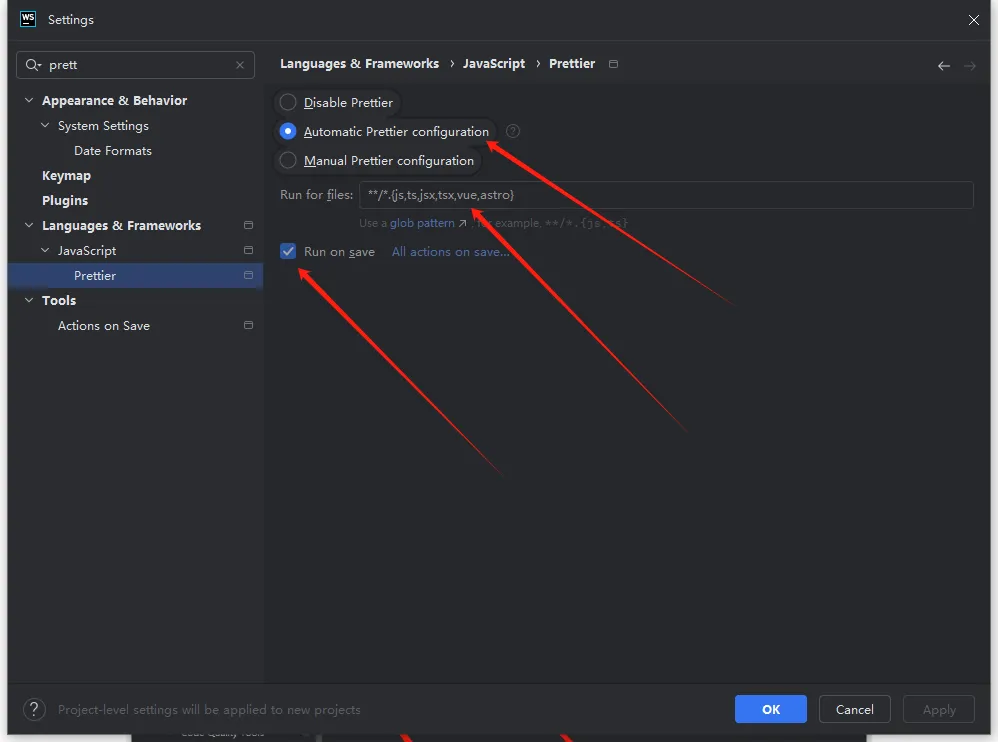
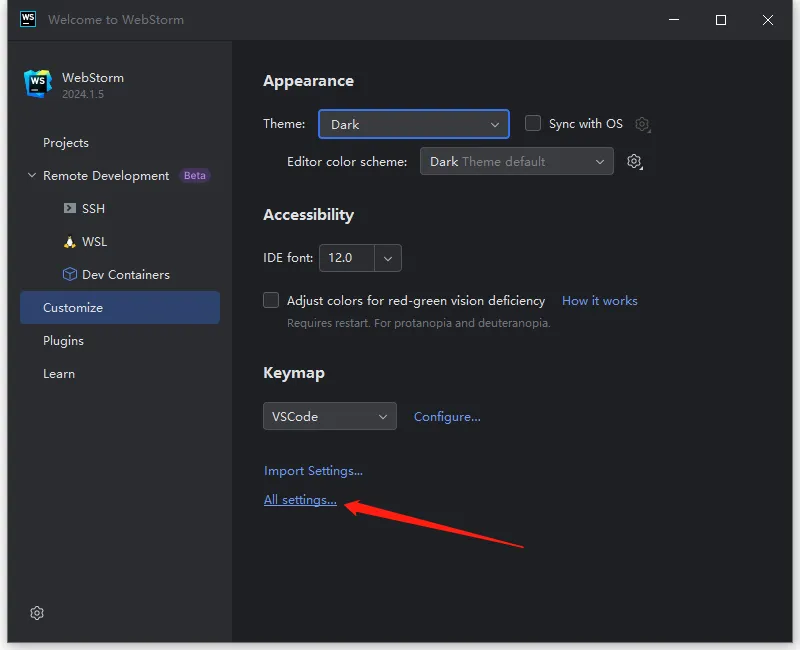
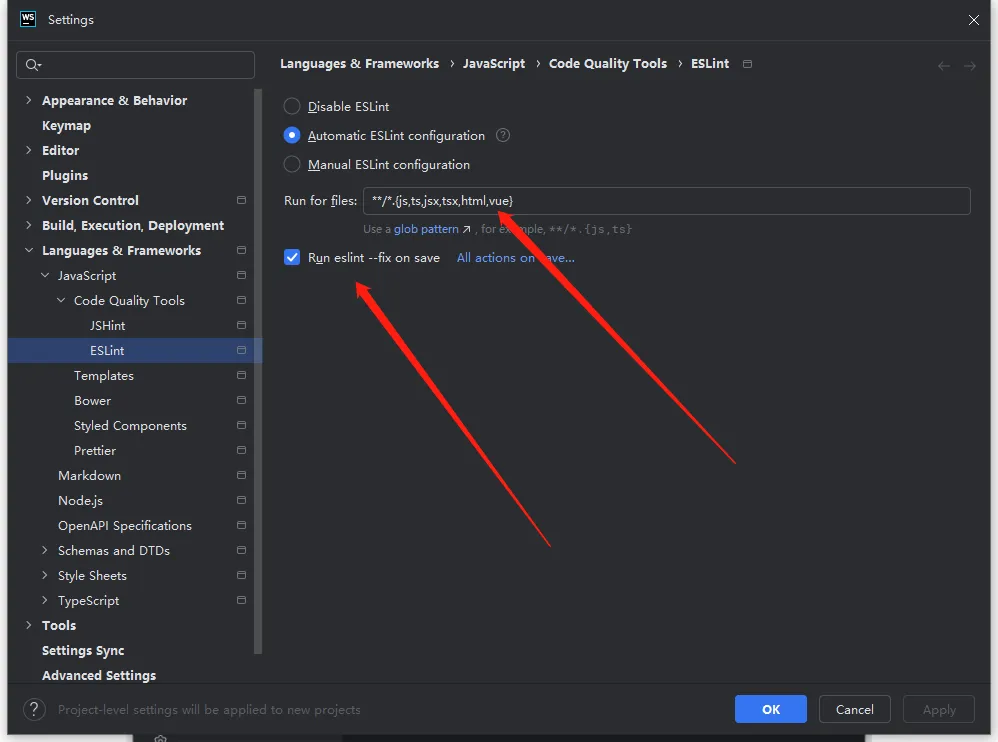
webstorm 配置格式化
- webstorm 全局配置修改需要在未打开项目的时候进行设置
- 第一次打开项目生成
.idea文件夹的时候,才会读取全局配置。 - 不是第一次打开的删掉
.idea,重新打开即可。
step1
step2
step3